
If you’re getting started in RC in North America it may have come to your attention that there are two general kinds of radios: 2.4 GHz modern radios, and the older 72 MHz radios. As a matter of fact, there are more kinds than that. 2.4 GHz equipment is subdivided into categories based on the specific type of coded signal used by the various manufacturers. These radios have the capability to switch from one channel to another within their designated frequency, thus avoiding interference when more than one person is operating a model. The older style single frequency radios operate on 72 MHz for aircraft only, 75 MHz for cars and boats only, and 27 MHz for any kind of RC vehicle. There are also 50 and 53 MHz, reserved for those holding an amateur radio operator’s license. In each of these single channel frequencies, the radios can use either an AM, FM, or PCM signal. Here’s a chart of the frequencies in use for RC in North America.
What are the differences between old radios and new radios, and why would you choose one over the other? This is the kind of question I always ask, because I’ve noticed that the conventional wisdom does not necessarily reflect the best choice. We’ve all noticed that the majority of the RC community has switched over to 2.4 GHz, and there are some good reasons for this shift, but not all of the changes are for the better. It’s not a slam-dunk case one way or the other.
First, let’s go through the pros and cons of the old technology. On the positive side, these frequencies are licensed by the federal government for use in controlling RC vehicles. The transmitters can legally broadcast at 1 watt, which provides a very respectable range. You can still control your plane as far as you can see it, and if it flies out of sight you still have a chance of getting it back if you give it the right inputs, because you actually can still control it after you can no longer see it. The long waves of the 72 MHz band can bend around objects, so if you fly a plane behind a barn, a car, a tree, or even a low hill, you are still in control. The receiver has a long antenna, which can pick up a signal no matter the plane’s location or position. The antenna can’t be blocked by the engine, and it is still effective in the vicinity of carbon fiber and metal objects. 72 MHz also has some disadvantages. That long, effective antenna has to be routed through the fuselage. Only one radio at a time can be operated per channel. There are 50 channels, but chances are that duplicates will arrive at the field at the same time. Even if you practice good frequency control, some doofus can show up later, turn his radio on, and shoot your plane down. Worse yet is when that doofus is you, and you are responsible for somebody else’s loss. AM and FM signals are subject to jamming interference from outside sources, sometimes even from interference patterns created by combinations of other frequencies. And of course the most common problem experienced when using 72 MHz radios is damage to the receiver crystal caused by crashing. Back in the old days you would just do an engine-on test, and if you got a glitch you would install a new crystal, but it’s hard to get new crystals nowadays. However, just before the old radios went out of fashion, most manufacturers had switched over to synthesized receivers that could be matched to the transmitter frequency with the push of a button, with no need for a crystal.
2.4 GHz radios were offered to the public as the answer to the shortcomings of 72 MHz radios. No frequency control effort is required at the flying field because your radio sends a coded signal to its own receiver, and if there is too much activity on a specific frequency it can switch itself to another channel to avoid interference from identical radios. If unmanageable interference is encountered, the controls will lock in “safe mode”. And of course, as we’ve all heard many times, there is no long antenna to fool with. There are a few disadvantages. Although the range is shorter than a 72 mhz radio, it can still fly as far as you can see it, so that’s no big deal, but the short wavelength causes these radios to operate only in line of sight. In other words, if you fly behind an object and you can’t see your plane, you’re not controlling it. If your antenna gets blocked by the engine, electric motor, battery pack or other metal object in the plane itself, it will lose signal. This risk is mitigated by using a receiver with more than one antenna, or even a satellite receiver. When the receiver loses signal it goes into the aforementioned “safe mode” which means that it neutralizes the controls and you can’t do anything until it reboots, which can take a second or two. If it happened to be in a funny position, good luck. Coded signals are supposed to allow 2.4 GHz radios to operate in noisy environments because they are listening only to their own code, but I have seen many airplanes crash due to interference coming from the local fire station. I flew my 72 MHz equipment alongside my 2.4 GHz enthusiast friend, and he has had at least 10 planes crash when they come too close to that fire station, but it never affected my planes. To be fair, I have been to other locations where airplanes crashed on 72 mhz while 2.4 ghz was unaffected.
The reason the new radios operate on 2.4 GHz is because of microwave ovens. Because of the difficulty of making an affordable oven that doesn’t produce a ton of radio interference, the 2.4 GHz frequency was left open, while other bands were licensed for specific applications. Many decades later anybody who wants to sell a garage door opener, blue tooth, wifi router, or radio controlled toy uses this wild west 2.4 GHz free for all frequency. Here’s what Wikipedia has to say about 2.4 GHz. Will it reach a saturation point and cause an intolerable level of safe mode lockups? Time will tell.
So, what does all of this mean to you, the prospective radio user? Should you follow the herd to 2.4 GHz, or should you use an old 72 MHz radio like some kind of hipster? That all depends on your personal situation. Some flying clubs allow only 2.4 GHz nowadays, to eliminate any possibility of interference (which hardly seems fair, since 72 mhz is licensed by the FCC for flying). When everybody was on 72, clubs used to have transmitter impounds, frequency flags, frequency boards with clothespins, or other such schemes to keep people from shooting each other down. It sure seems easier to just tell all of the members to leave their 72 MHz gear at home. What if you fly at an all-frequencies club? If you fly at a small club or with a few friends at somebody’s pasture, or by yourself out in the boondocks, you can pretty much use whatever radio you have on hand. Just ask everybody present if there is anybody else on your channel. We had tons of fun with 72 MHz FM radios before 2.4 GHz came along, so it’s hard to believe that 72 MHz is as bad as people say it is.
That’s a lot of info, but maybe you’re still wondering which type of radio to use. Or maybe you’re still using 72 mhz radios and wondering if you should switch over to 2.4 ghz. Read on, and think of what kind of person you are and how you like to use equipment.
Most of the high end 2.4 ghz radios nowadays have very impressive features such as the ability to plug in 10 or 12 servos and slave any one of them to any other. You can program the direction and degree of travel of each servo, including exponential travel. You can mix channels together, as in the case of flap and aileron functions to turn your ailerons into flaperons. Your radio can remember settings for more airplanes than you will ever own. The features that are available nowadays are truly impressive, and they are all controlled by scrolling through menus on a little computer screen. If you like programming fancy radios, this is a great time to be alive.
If you don’t care for radio razzle dazzle, maybe you still want to get a modern 2.4 ghz radio, but something without a computer screen. That sounds sensible, but it seems that new radios are either razzle dazzle or rock bottom. The cheap sets tend to have only the most basic functions such as servo reversing, and that’s about it. Some have a few extra features, but the engineering is super lame. I have a 2.4 ghz radio with a fifth channel for flaps or retracts. I like a flap control to be on a knob, or at least a three position switch for up, half, and down, but this one is just two positions. And it has a dual rate switch that controls ailerons, rudder, and elevator all on one switch, with no rate adjustment. This seems basically useless as far as I can tell. Why would they even make a radio like that?
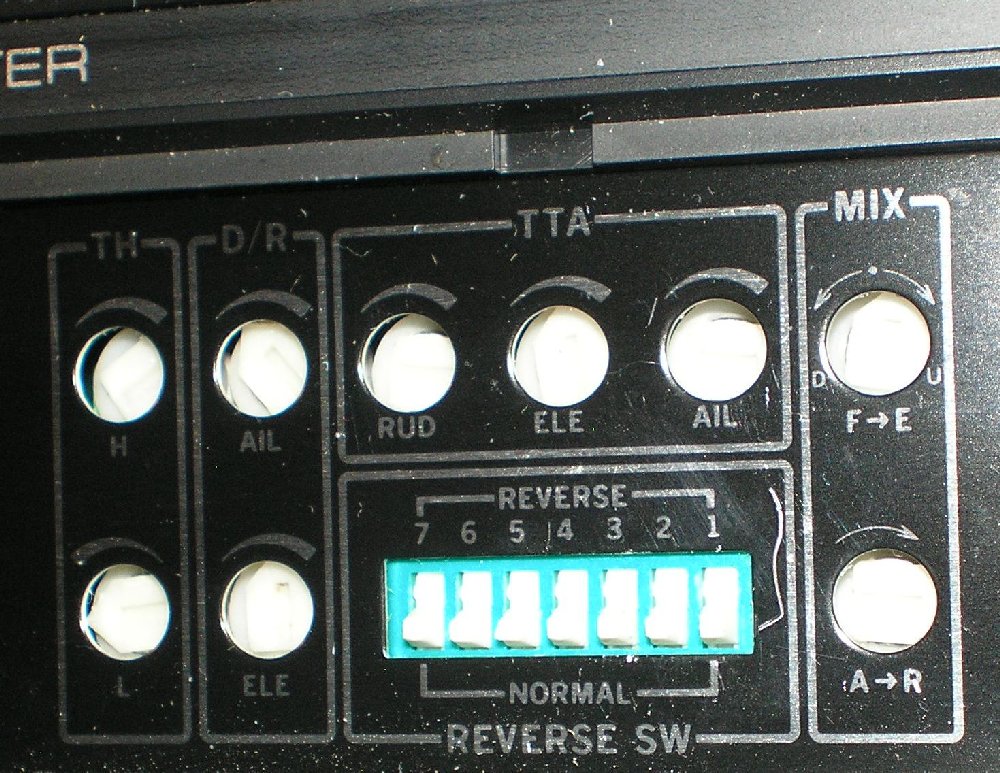
The old FM radios were marketed in a three tier scheme. Low end radios had four channels with servo reversing, and that’s all. At the high end, what we used to call “computer radios” had multi model memory, reversing, channel mixing, exponential travel, end point adjustment, etc, all done digitally on a screen, plus other features such as dual rates, with digitally controlled rate settings. The mid tier radios had no computer screen or menus, but they did have nice features that the low end radios lacked. They typically had 5 to 7 channels, dual rates, rate adjustment, basic mixing for flaps to elevator and ailerons to rudder, and a decent three position flap switch or infinitely variable knob. These functions were adjusted via little tiny switches and trim pots that were usually found under a hatch and manipulated with a small screwdriver. Here’s a great example, the Airtronics Vanguard 7 channel. I have one of these radios that I bought in the 1990s.
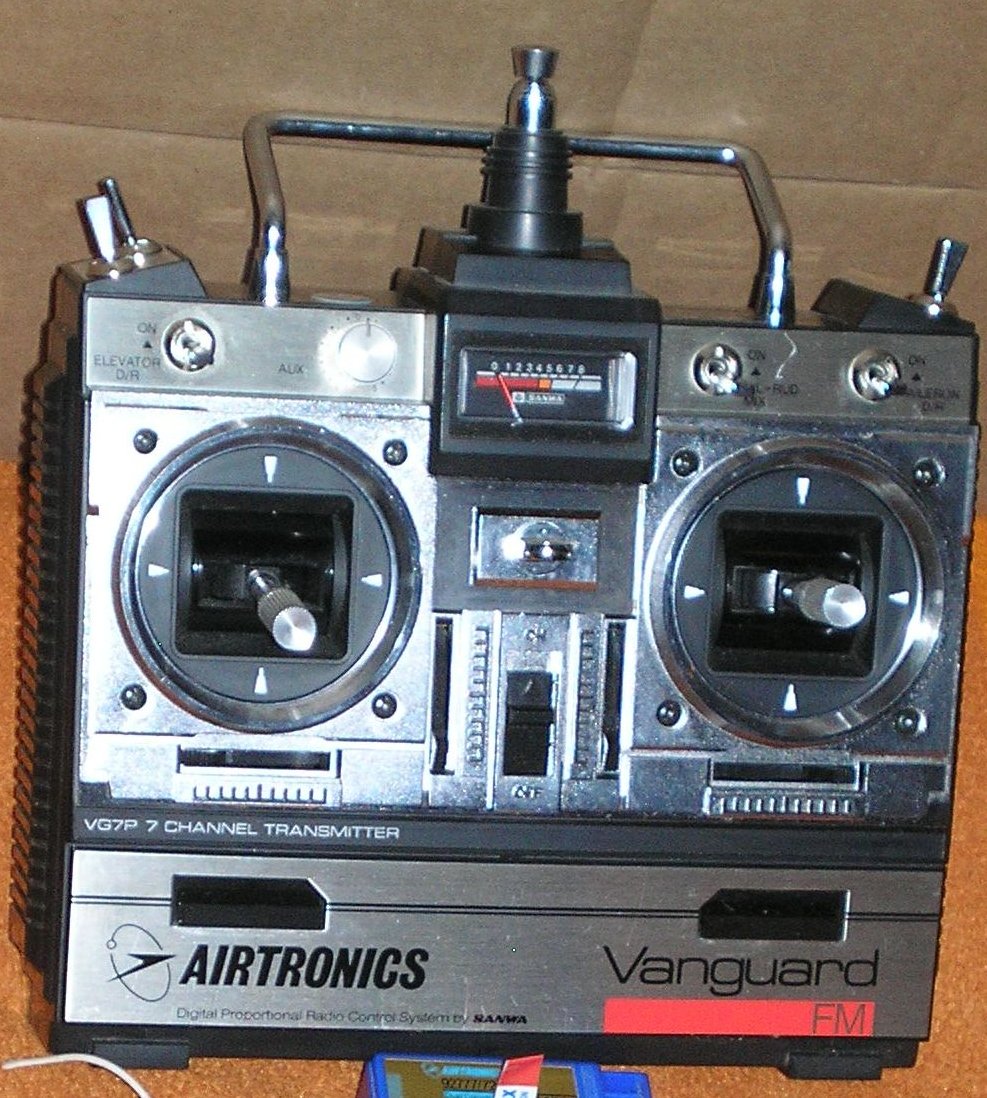
The aileron and elevator dual rates are at the top, facing the operator. There is an aileron to rudder mixer to the right of the battery meter. Believe it or not, this is my favorite function on this radio, because I use it for three channel airplanes. My brain wants to steer on the ground with the rudder stick, but a three channel plane has the rudder connected to the aileron stick, and the rudder stick doesn’t do anything. If you mix aileron to rudder at 100% and plug the rudder servo into the rudder channel, then both sticks control the rudder. The switches for flaps, retracts, and pilot training are on top, and there’s a knob for channel 7. If you open the little door at the bottom you find all the adjustments and reverse switches.
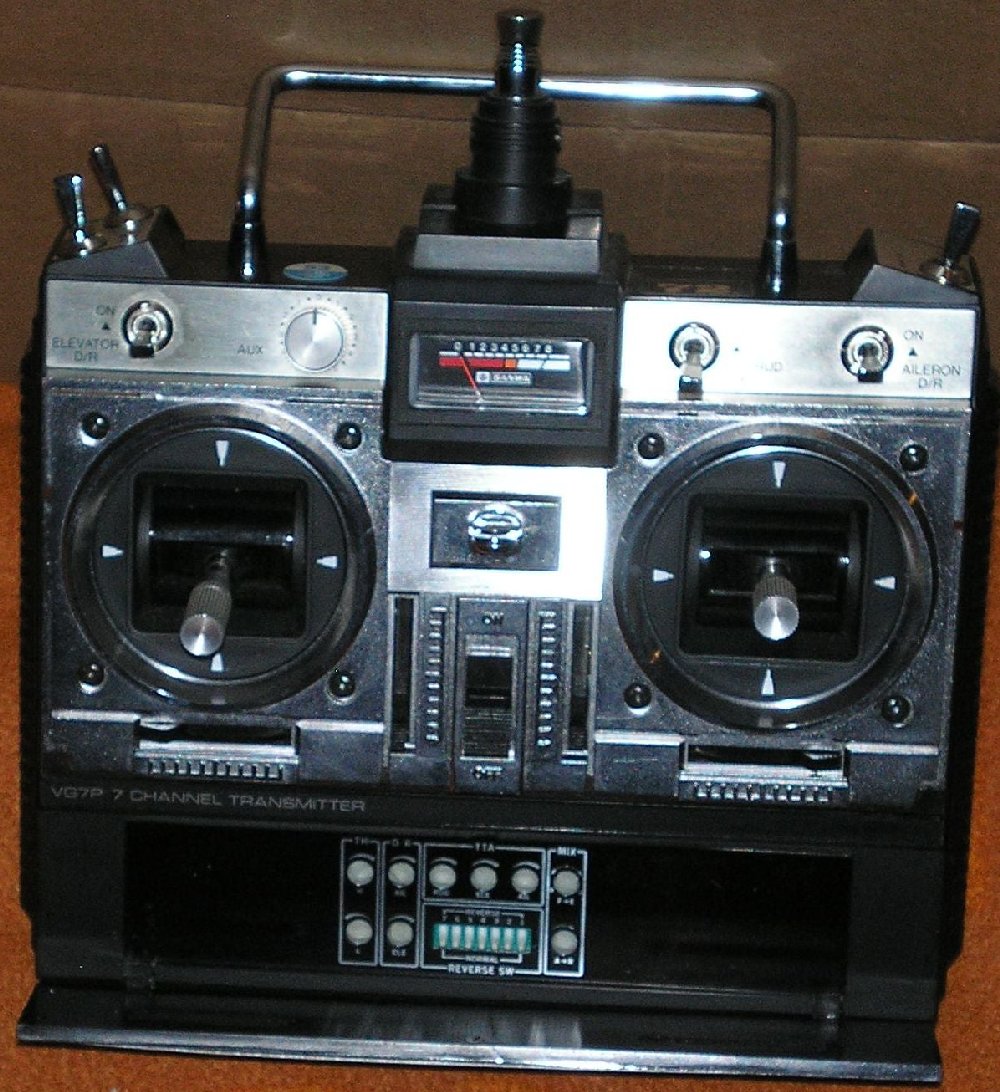
And here’s a closer look at those controls.
This is really the main reason why I’m sharing my thoughts on modern vs old fashioned radios. The radio manufacturers seem to have abandoned the mid tier radio. If you like programming, you’re sitting pretty because the fancy radios are better than ever. But there is another type of person I know of because I am one. This is the type of person who likes airplanes but doesn’t like programming. Scrolling through menus actually makes me angry, and I hate touch screens. Another thing that really sends me over the edge is beeping. It seems like just about everything nowadays beeps every time you do anything. My friend’s radio beeps when the throttle stick goes below 1/2. Worse than that, it talks. Maybe I’m crazy, but I really hate that. Just give me a basic radio, maybe dual rates, and a real flap control because I build a plane with flaps every ten years or so, and as long as it doesn’t beep and doesn’t have a screen on it I’m happy. But you can’t buy that kind of radio from a retailer nowadays because they stopped making it 25 years ago. That’s the real reason I still have 72 mhz radios. I hate computer radios, but I like a few simple features that are controlled by knobs and switches.
Fortunately there is a clever way to use any transmitter you like if you prefer the old style transmitters, and also take advantage of the benefits of 2.4 ghz. RF modules are available to retrofit any vintage transmitter and turn it into a 2.4 ghz transmitter. This is a very attractive option for guys like me.
I’m not telling you to be like me, though. Ask yourself how you like to interact with a model airplane radio, and you shall find your own path.
There’s just one more point to cover. Maybe you’ll use new radios, or maybe you’ll use old ones. If you decide to use an old radio or radios, here are your rules. First, open the back of the transmitter and check the battery leads for corrosion. Equipment left sitting with batteries installed will develop black wire syndrome, which will crash your plane. Replace the batteries if they don’t hold a charge, and if your wires are black replace the batteries and the wires. After your radio is definitely working correctly, take it to your flying site and enlist an assistant to help you check for proper operation at a distance, to make sure it works at full range. If you don’t have a friend to help, your best bet is to turn the radio on and set the transmitter down, then walk away holding the airplane. Watch for glitches in your controls as you walk away from the radio. If you find a problem with interference, don’t use that channel. Get a radio on a different channel, or switch your radio to a new channel if it’s capable, and start over with a new range check Back in the old days different flying sites sometimes had a channel or two that were known to be glitchy, and everybody avoided those channels at those specific sites. After you determine that your radio will work at your field, just make sure you are aware of any person who is using a radio on the same channel as yours. If there are two of you on the same channel, never turn on the other radio when one of the planes is in use.