
The conventional unit of measurement for the density of balsa in the USA is pounds per cubic foot. Those who build rubber band powered models and other super lightweight planes like to use what’s known as “contest” balsa, which typically weighs 6 pounds or less per cubic foot. Wing spars and other load bearing members are made from hard balsa, with density as high as 18 to 20 pounds per cubic foot. Medium balsa is preferred for general construction of the rest of the plane. Balsa weighing 8 to 12 pounds per cubic foot is typically considered to be medium balsa.
If you like to build from scratch you can usually tailor your design to the wood you have on hand. Harder balsa can be used farther forward in the airplane, for instance when building a balsa engine cowling. The tail should be built from lighter wood. Spars can be made of medium balsa, as long as the cross section is large enough to handle the load. For a typical sport plane with sheeted wings, medium balsa is used because super light balsa can’t stand up to rough handling. I’ve put my thumb right through the wing when the sheeting was too light. On the other hand, hard balsa is just too heavy for big pieces of wing sheeting. You want your wing sheeting to be like Baby Bear’s porridge: just right. But if you don’t have balsa sheet of the appropriate weight you can build a non-sheeted wing instead. With a little bit of experience you can judge a piece of balsa by picking it up, flexing it, and comparing it to other pieces of balsa.
Before you have experience, it’s nice to have some numbers to work with. A piece of sheet balsa weighs a lot less than a pound, and the volume is far less than a cubic foot, so if you want to calculate the density of a piece of balsa there’s a lot of math involved.
Let’s say you have a piece of 1/16 x 3 x 36 balsa. That’s .00528 ft x .25 ft x 3 feet, or .0039 cubic foot. Weighing the balsa on a digital scale will give you the weight in ounces, so you’ll have to divide that by 16 to get the weight in pounds.
This makes sense, but now that we’ve thought about how it works, here’s a formula to do it the easy way without switching units. Weight is in ounces, dimensions are in inches, and the answer is automatically converted to pounds per cubit foot.
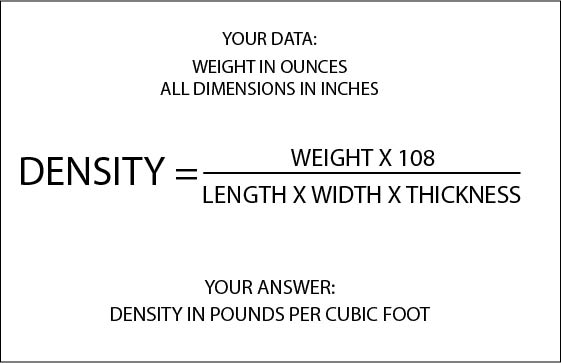
OK, now that you know the formula here’s a calculator shortcut. Not all calculators handle input the same way. Some remember what you already did and allow you to carry a result forward to the next function without pressing =, but some don’t. Some it’s not obvious how to do it. Here’s how you figure your density without writing anything down and without clearing the calculator. Weigh the sheet. Put in the number of ounces, multiply by 108, then say divided by length equals, then divided by width equals, then divided by thickness equals. The number on the screen is density in pounds per cubic feet.
Here’s the next shortcut. 3 x 36 is 108, which is part of the algorithm on the bottom of the fraction when you are dealing with 3 x 36 inch sheets. We also have 108 as a constant on the top of the fraction. In the case of a 3 x 36 inch sheet the two instances of 108 will cancel each other and leave DENSITY = WEIGHT / THICKNESS all by itself. Weigh a 3 X 36 sheet in ounces, divide that number by the thickness in inches, and that’s your density in pounds per cubic foot. Obviously 4 inch width and 48 inch length don’t allow this shortcut.
Here’s a handy chart of balsa sheet thicknesses expressed in decimal format:
